

Understanding Reorders and Refunds
If one of your customers has purchased Shipping Protection, they will contact us if they have any issues with their shipment. They can email [email protected], chat with us on our website, or fill out a reorder request at app.corso.com.
All Reorders and Refunds are paid for with the money you collect from your customers adding Shipping Protection to their order. We will deduct any Primary Reorder or Refund amounts from our monthly invoice. All of the orders, reorders, and refunds will be clearly visible in the invoice we send.
Primary Reorders - Shopify API
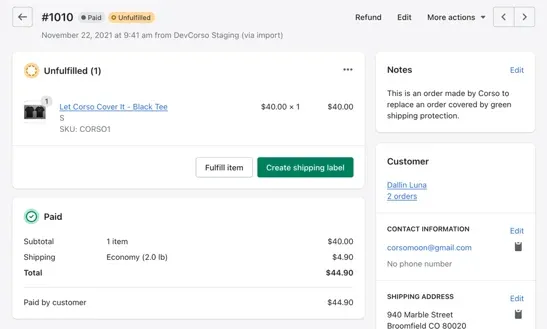
Section titled “Primary Reorders - Shopify API”When we receive a request, we work with your customer to make sure we can resolve their issue and that they are happy. If the items are still in stock, we will simply reorder the items as a new order number for you. We are integrated with Shopify to do this with Corso’s internal Merchant Support Application.
The new order will be created and we will mark the order as Paid with a Note from Corso. We mark it as paid because the funds from Shipping Protection covers the cost. We will deduct this amount from the monthly invoice that Corso sends for Shipping Protection.
Alternative Reorders - Shopify Admin
Section titled “Alternative Reorders - Shopify Admin”Once in a while an item is out of stock or the customer wants something of equal value. In this scenario, our agents will place the order directly through your Shopify Admin on behalf of the customer. The order will appear as a regular order in Shopify. Our agents will also record a manual reorder in Corso’s internal system so that it shows up correctly in your billing and reports. Since these reorders are still covered by Shipping Protection funds, the amount will be deducted from the monthly invoice.
Refunds
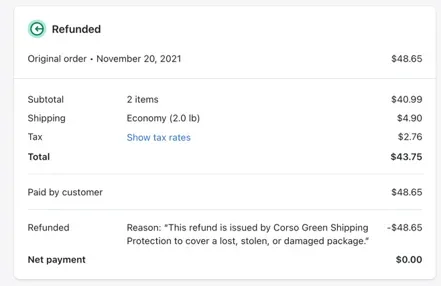
Section titled “Refunds”We leverage the Shopify API to issue refunds which utilizes same mechanism you have available in the Shopify Admin for orders. This makes it easy for your customer to receive the refund with their order payment method. Like other refunds, Corso refunds are taken from the account you have on file with Shopify. We then deduct that amount from the Shipping Protection monthly invoice so you don’t have to pay for it.
You will see refunded items in your Shopify Admin.
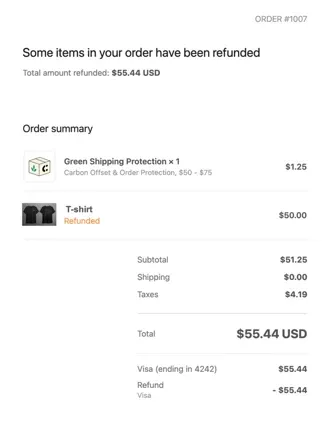
An email is sent to the customer when an order is refunded.
Customer Support
Section titled “Customer Support”Our friendly support staff is trained on our tools and technology which allows us to quickly respond to any shipping issues that your customers have. Using these methods of Primary Reorders, Alternative Reorders, and Refunds makes sure we can boost your customer satisfaction and brand loyalty.